
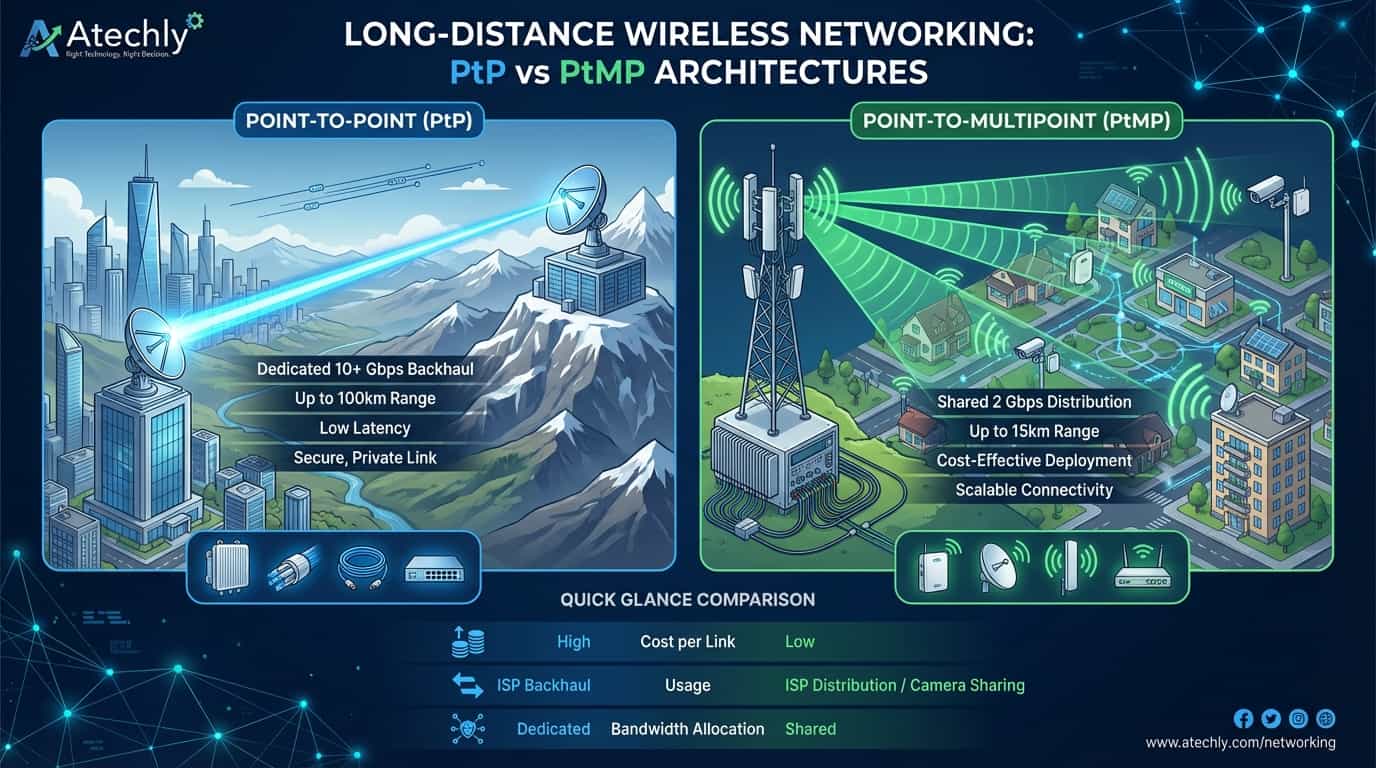
wireless devices: The Invisible Fiber of 2026 In an era where high-speed data is non-negotiable, wireless networking has evolved from a “backup option” to a primary infrastructure solution. For ISPs, industrial plants, and security firms in India, digging trenches for fiber optic cables is often too slow and prohibitively expensive. This is where long-distance wireless devices come into play. Point-to-Point (PtP) functions as a dedicated “Wireless Bridge.” It involves two high-gain radios aligned perfectly to create a private data tunnel. Think of it as a virtual fiber cable stretched through the air. In 2026, PtP links are achieving speeds exceeding 10 Gbps over distances of 20km to 50km, making them ideal for ISP backhaul and connecting remote office branches. Point-to-Multipoint (PtMP) works on a “Base Station” model. One central sector antenna (the Access Point) broadcasts a signal to multiple “Subscriber Modules” (CPEs) within a specific arc (usually 30ยฐ, 60ยฐ, or 90ยฐ). This is the standard for localized ISP distribution (WISP) and large-scale CCTV deployments, such as monitoring an entire city square or an industrial campus from a single command center. Main Purpose & Application Areas ISP Bandwidth Distribution: Small and medium ISPs use PtMP to provide “Last Mile” connectivity to residential buildings without physical wiring. Long-Distance 4K/8K Camera Sharing: Security agencies use PtP links to transmit high-resolution video feeds from highway toll booths or forest borders back to a central NVR. Campus Network Sharing: Universities and hospitals use these devices to share local servers, ERP systems, and internet across multiple buildings. Disaster Recovery: Rapidly deploying internet to areas where physical infrastructure has been damaged. Types & Versions Wireless Device Type Description & Features Best Usage / Distance Integrated Antennas Radio and antenna are housed in a single, compact unit. Simplifies installation and reduces cable loss. Short to Medium range (2km โ 10km). Ideal for quick deployments. Connectorized Radios The radio unit is separate, allowing users to attach high-gain external dish antennas via RF cables. Extreme Long-range (30km+). Perfect for ISP backhaul across rough terrain. Millimeter Wave (mmWave) Operates at the 60GHz frequency. Delivers fiber-like speeds with multi-gigabit throughput. Short range (Under 2km). Requires strict Line of Sight (LoS). High-density urban links. Comprehensive Comparison Feature PtP (Point-to-Point) PtMP (Point-to-Multipoint) Typical Capacity 1 Gbps to 10+ Gbps 500 Mbps to 2 Gbps (Shared) Max Distance Up to 100km+ (with dish) Up to 10km-15km Setup Complexity High (Precise Alignment) Medium (Sector Alignment) Interference Risk Low (Highly Directional) Moderate (Broad coverage) Primary Goal High-capacity Backhaul Multi-user Distribution The Indian Market: Brands & Pricing Most Used Brands: Ubiquiti (AirFiber, LTU, PowerBeam): The gold standard for WISPs in India due to the intuitive interface. MikroTik (NetMetal, BaseBox): The go-to for advanced networking professionals who need deep routing control. Cambium Networks (ePMP, PTP series): Preferred for high-density enterprise and government projects. Mimosa (C-Series, B-Series): Gaining traction for high-performance urban links. Average Price in India (2026): Basic CPE/Client Node: โน4,500 – โน7,500 Mid-Range PtP Bridge Pair (10km): โน18,000 – โน28,000 Carrier-Grade Base Station: โน45,000 – โน1,20,000 Current Trends & Upcoming Innovations AI-Spectrum Sensing: Radios now use machine learning to predict interference patterns and switch frequencies before the connection drops. Sustainable Energy: Newer outdoor radios are being designed with ultra-low power consumption to run entirely on small solar panels for remote forest/farm monitoring. Wi-Fi 8 Implementation: Early prototypes of Wi-Fi 8 long-range devices are focusing on “Reliability over Speed,” ensuring stable pings for gaming and VOIP over wireless links.

Google Workspace for Education: 10 Powerful Reasons to Upgrade Your Classroom Today
Empowering Minds: Sahi Tech. Sahi Growth. Google Workspace for Education is a powerhouse of cloud-based communication and collaboration tools tailored specifically for K-12 and higher education institutions. It isn’t just a collection of apps; it is a digital transformation engine. By integrating the familiar interface of Gmail, Docs, and Drive with the specialized management of Google Classroom, it creates a unified environment where learning has no borders. In an era where digital literacy is as vital as reading and writing, providing students with the “Right Technology” ensures they are prepared for a global workforce. For administrators, it’s about making the “Right Decision” to secure data while reducing IT overhead. This ecosystem allows teachers to reclaim their time from administrative paperwork and reinvest it into personalized student mentorship. From real-time co-authoring on research papers to automated grading systems, Google Workspace for Education is the backbone of the modern Indian academic landscape. Main Purpose / Use At Virtual & Hybrid Classrooms: Hosting seamless online lectures via Google Meet. Collaborative Research: Enabling multiple students to work on a single document simultaneously. Paperless Assignment Management: Distributing, collecting, and grading work digitally via Classroom. Institutional Administration: Managing faculty payroll, student records, and alumni outreach securely. Core Features Google Classroom: The central hub for organizing classes and assignments. Gemini for Google Workspace: AI-powered assistance for lesson planning and content creation. Unlimited Collaboration: Docs, Sheets, and Slides with version history and real-time commenting. Advanced Security: Data Loss Prevention (DLP) and proactive threat detection. Meet Enhancements: Breakout rooms, polls, and Q&A sessions for interactive learning. Feature / Version Education Fundamentals Education Standard Teaching & Learning Upgrade Education Plus (Full Suite) Core Purpose Foundational collaboration tools. Advanced security & analytics. Enhanced classroom & video tools. The comprehensive flagship solution. Google Meet Capacity 100 Participants 100 Participants 250 Participants 500 Participants Security Tools Basic Security Advanced Security Center + Investigation Tool Basic Security Full Security Center + eDiscovery (Vault) Originality Reports 5 per class 5 per class Unlimited Unlimited Storage (Pooled) 100 TB baseline 100 TB baseline +100 GB per license +20 GB per student license Avg. Price (India) โน0 (Free) ~โน260/student/year ~โน330/user/month ~โน480/student/year Google Workspace for Education Tools List Right Technology. Right User. Right Decision. Communication Gmail Google Meet Google Chat Google Groups Collaboration Google Docs Google Sheets Google Slides Google Forms Google Sites Classroom Control Google Classroom Assignments Originality Reports Google Calendar Storage & Search Google Drive Google Cloud Search Google Keep Google Photos AI & Admin Gemini (AI Assistant) Admin Console Google Vault Endpoint Management Market Trends & Innovations Hyper-Personalization: Using AI to create custom learning paths for students with different learning speeds. VR/AR Integration: Using Google Expeditions and 3D models within Meet to provide immersive history and science lessons. Privacy-First Learning: A shift toward “Sovereign Clouds” to ensure student data remains within Indian geographical boundaries. Need More Information? If you want more information about Google Workspace for Education, license procurement, or implementation support, please contact us: ๐ง support@atechly.in | ๐ 9922958767
Block Social Media on Your Office WiFi
In 2026, the average professional loses nearly 2.5 hours daily to digital distractions. In India, where “doomscrolling” through Instagram Reels and Facebook feeds has become a workplace epidemic, office managers are facing a tough choice. While connectivity is vital, unrestricted social media access is often the “silent thief” of your company’s time and bandwidth. What is Social Media Blocking? Social media blocking is a network-level restriction that prevents devices connected to your office WiFi from accessing platforms like Instagram, Facebook, and TikTok. Instead of monitoring individual screens, you manage the gatekeeper—your router. Understand Your Router Configuration & Basic Details Brand / Category Primary Use Case Blocking Method Key Advantage TP-Link SMEs & Home Offices Access Control / Parental Controls Affordable, user-friendly mobile app. D-Link Budget-Conscious Offices Website Filter / Firewall Rules Reliable hardware; “Blacklist” settings. Netgear High-Performance Teams Smart Parental Controls (Circle) Advanced security & stability. Cisco Large Enterprises Cisco Umbrella / ACLs Enterprise-grade security & analytics. Asus Creative & Tech Agencies AiProtection / Web & App Filter One-click category blocking. BSNL / FTTH Standard ISP Connections URL Filtering / Firewall Manual domain entry required. Jio/Airtel Managed Fiber Services Native App (MyJio/Airtel) Easy “Safe Internet” toggle. Detailed Step-by-Step Instructions 1. For FTTH Routers (BSNL / Private ISPs) FTTH routers like Syrotech and Netlink are very common in India. Step 1: Connect to WiFi and open 192.168.1.1. Step 2: Log in (Default pass is often stdONU101 or Syro@43210$). Step 3: Go to the Security tab on the top menu. Step 4: Select URL Filter from the left sidebar. Step 5: Enable URL Filtering, select “Blacklist,” and add www.instagram.com. Click Add/Apply. 2. For Jio & Airtel Users These providers prefer you use their apps for a better user interface. JioFiber: Use the MyJio App. It is the easiest way to block specific devices or websites without touching complex IP settings. Airtel: Activate the Airtel Secure Internet service (usually a small monthly fee or included in high-end plans) to block categories like “Social Networking” with one click. 3. For Basic Brand Routers (TP-Link/D-Link) TP-Link: Look for Advanced > Parental Controls. You can create a “Profile” for the whole office and add “Keywords” like facebook to block all related traffic. Asus: Use the AiProtection menu. It has a dedicated “Web & Apps Filters” section where you can check a box for “Social Networking.” Router Category Login Details (IP / User / Pass) Final Execution Step Basic Routers(D-Link, TP-Link, Asus, Netgear) IP: 192.168.0.1 / 192.168.1.1 User: admin Pass: admin / password Go to Access Control > Target. Create a “Blacklist” and add domains like facebook.com. Set status to Enable. FTTH Routers(Syrotech, Optilink, Netlink, BSNL) IP: 192.168.1.1 User: admin Pass: stdONU101 / Syro@43210$ Navigate to Security > URL Filter. Enable the filter, select Blacklist, and add keywords/URLs. Click Apply. JioFiber App: MyJio App Web: 192.168.29.1 Login: Via OTP / Mobile Open MyJio > Fiber > My Devices > Advanced Settings > Parental Control. Add URLs to the Block list. Airtel Xstream App: Airtel Thanks App Web: 192.168.1.1 Login: admin / admin In Airtel Thanks App > Manage > Secure Internet. Toggle Child Safe mode or block “Social Media” category manually. *Note: Default passwords may vary. Check the sticker on the back of your router for exact credentials.* Need to Block Social Media Stop workplace distractions today! Contact us for expert remote assistance to block any website on your network for just โน100 to โน500. ๐ง support@atechly.in | ๐ 9404451851
Build a Powerful Gaming PC with Used Parts: 7 Easy Steps to Save Big!
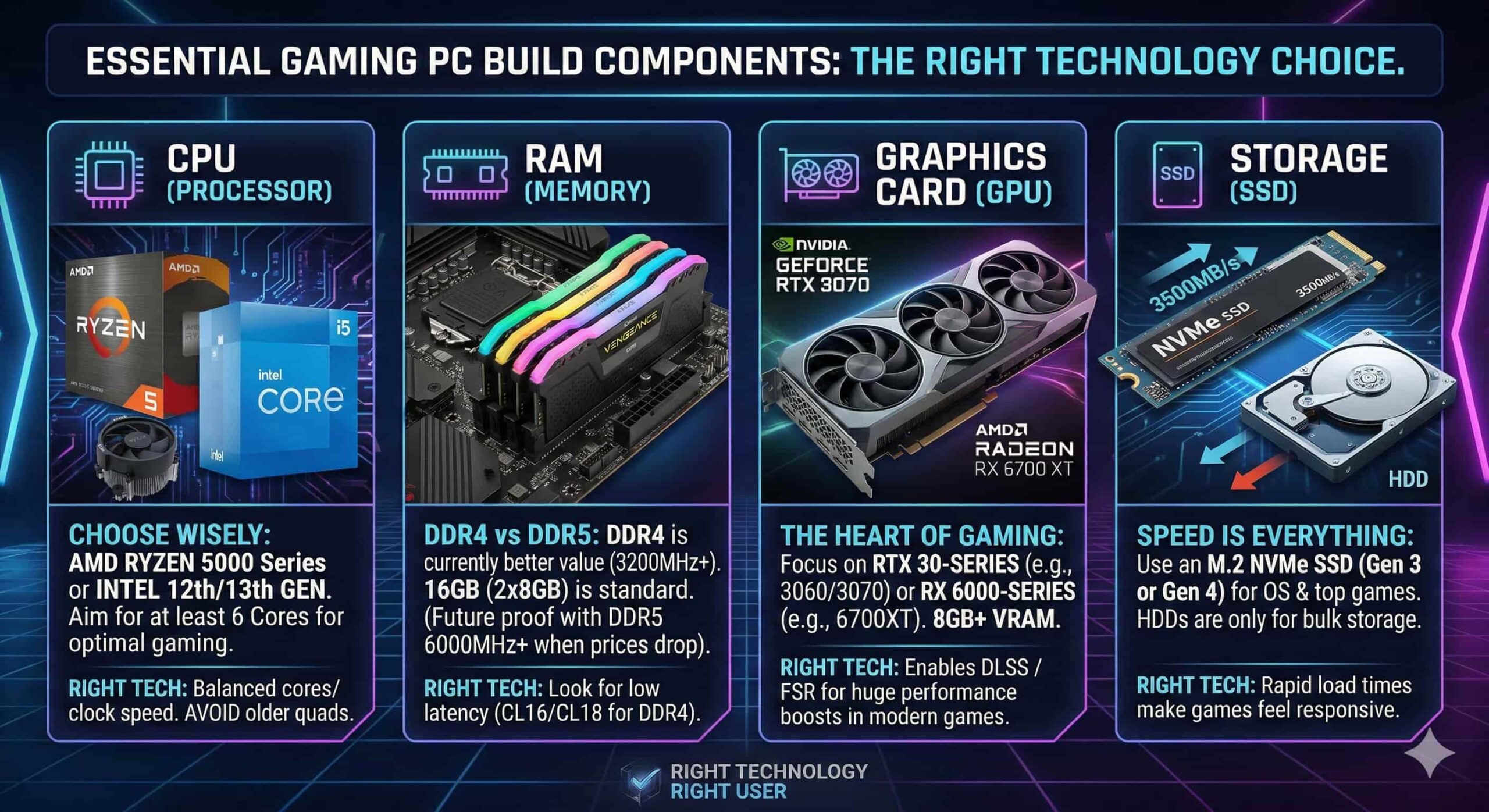
Hey there, fellow gamers! In a world of flashy new releases and jaw-dropping graphics, it’s easy to think that getting into gaming requires a significant financial investment. But what if there was a way to experience the thrill of your favorite titles without breaking the bank? The answer lies in the world of used gaming PC components. By carefully selecting pre-owned parts, you can construct a powerful gaming machine at a fraction of the cost of buying new. This guide will navigate you through the exhilarating and potentially lucrative world of building a used gaming PC. We’ll explore the benefits, the steps involved, and the key considerations to ensure a smooth and rewarding experience. Unlocking the Benefits of a Used Gaming PC Building a used gaming PC offers a multitude of advantages, particularly for budget-conscious gamers and those looking to get the most bang for their buck. Significant Cost Savings: The biggest draw, of course, is the massive cost reduction. You can often snag components for less than half of their original price, allowing you to build a system with performance that far exceeds its price tag. Higher Performance for Your Budget: With the savings, you can afford components that would otherwise be out of your reach, such as a more powerful graphics card or a faster processor. This means you can experience demanding games at higher settings and smoother frame rates. Environmental Responsibility: By opting for pre-owned parts, you’re not only saving money but also contributing to environmental sustainability. Giving second-hand components a new life reduces electronic waste and lessens the environmental impact of manufacturing new parts. The Thrill of the Hunt: There’s a certain satisfaction that comes with hunting down deals and assembling a powerful machine from seemingly disparate parts. It’s a journey of discovery and a rewarding DIY project. Choosing the Right Used Components While the savings are enticing, navigating the used market requires some careful consideration. Let’s delve into the key components and what to look for: Central Processing Unit (CPU) Compatibility is Key: The CPU must be compatible with your motherboard’s socket type. Research the specific socket for your chosen motherboard before selecting a processor. Performance Considerations: Look for CPUs with higher core and thread counts for better multi-tasking and performance in demanding games. Don’t be afraid of slightly older generations; they can still pack a significant punch. Overclocking Potential: If you’re interested in performance tweaks, look for CPUs that are “K” series (Intel) or “Black Edition” (AMD), as they often support overclocking. Graphics Card (GPU) The Heart of Your Gaming Experience: The GPU is arguably the most crucial component for gaming performance. Research the requirements of the games you want to play and choose a card that meets or exceeds those needs. Checking for Damage: Visually inspect the GPU for any signs of physical damage, overheating, or excessive wear and tear. Verification is Crucial: If possible, request a benchmark or a demonstration of the GPU running games to ensure it’s functioning correctly. Motherboard The Foundation of Your Build: The motherboard determines the features and expansion options available to you. Consider factors such as the chipset, support for different types of storage, and the number of RAM slots. Check for Common Issues: Examine the motherboard for signs of corrosion, bulging capacitors, or damaged pins in the CPU socket. Storage (SSD and HDD) SSD for Speed: An SSD is a must-have for lightning-fast load times and a responsive system. Look for M.2 NVMe SSDs for maximum performance. HDD for Capacity: An HDD provides ample storage for large libraries of games, media, and other files. Check for Health: Use software like CrystalDiskInfo to check the health and longevity of used storage drives. Power Supply Unit (PSU) Don’t Skimp on Power: A reliable PSU is essential for providing stable power to all your components. Calculate the total power consumption of your system and choose a PSU with at least a 20-30% wattage buffer. Prioritize Quality Brands: While it’s tempting to save money on the PSU, investing in a reputable brand with a good reputation for reliability is a wise decision. Avoid unbranded or generic PSUs. Memory (RAM) Match Compatibility: Ensure that the RAM type (DDR4, DDR5) and speed are compatible with your motherboard and CPU. Capacity for Multitasking: 16GB of RAM is generally considered the sweet spot for modern gaming, though 8GB can still suffice for less demanding titles. Case Cooling and Style: Choose a case that offers good airflow for efficient cooling and complements your personal aesthetic. Size and Features: Consider factors like motherboard form factor compatibility, storage drive bays, and cable management options. Navigating the Used Market in India Building a used gaming PC in India can be an exciting venture. Here are some key points to consider: Popular Online Marketplaces: Platforms like OLX, Quikr, and Facebook Marketplace are hubs for finding used computer parts. Dedicated Gaming Communities: Online forums and groups specifically for Indian gamers often have a dedicated section for buying and selling used components. Local Computer Shops: Don’t underestimate the potential of local computer shops; they may have a stash of used parts or be able to source them for you. Tips for a Successful Used Build Thorough Research: Invest time in researching the market value of components and the reliability of different models. Verification is Key: Always ask for clear photos, detailed descriptions, and, if possible, live demonstrations or benchmarks. Secure Payment Methods: Use secure payment methods whenever possible and consider meeting in public places for in-person transactions. Don’t Be Afraid to Negotiate: Polite negotiation is common practice in the used market. Test Components Promptly: Assemble and test your system as soon as possible after acquiring all parts. This allows you to identify any issues and seek recourse from the seller if necessary. Conclusion Building a used gaming PC in India is not only an economical choice but also a rewarding experience. By diligently following this guide, researching, and making informed decisions, you can create a formidable gaming machine that brings
Printer vs. Xerox Shop: 7 Shocking Reasons Why Owning a Printer is Cheaper in 2026
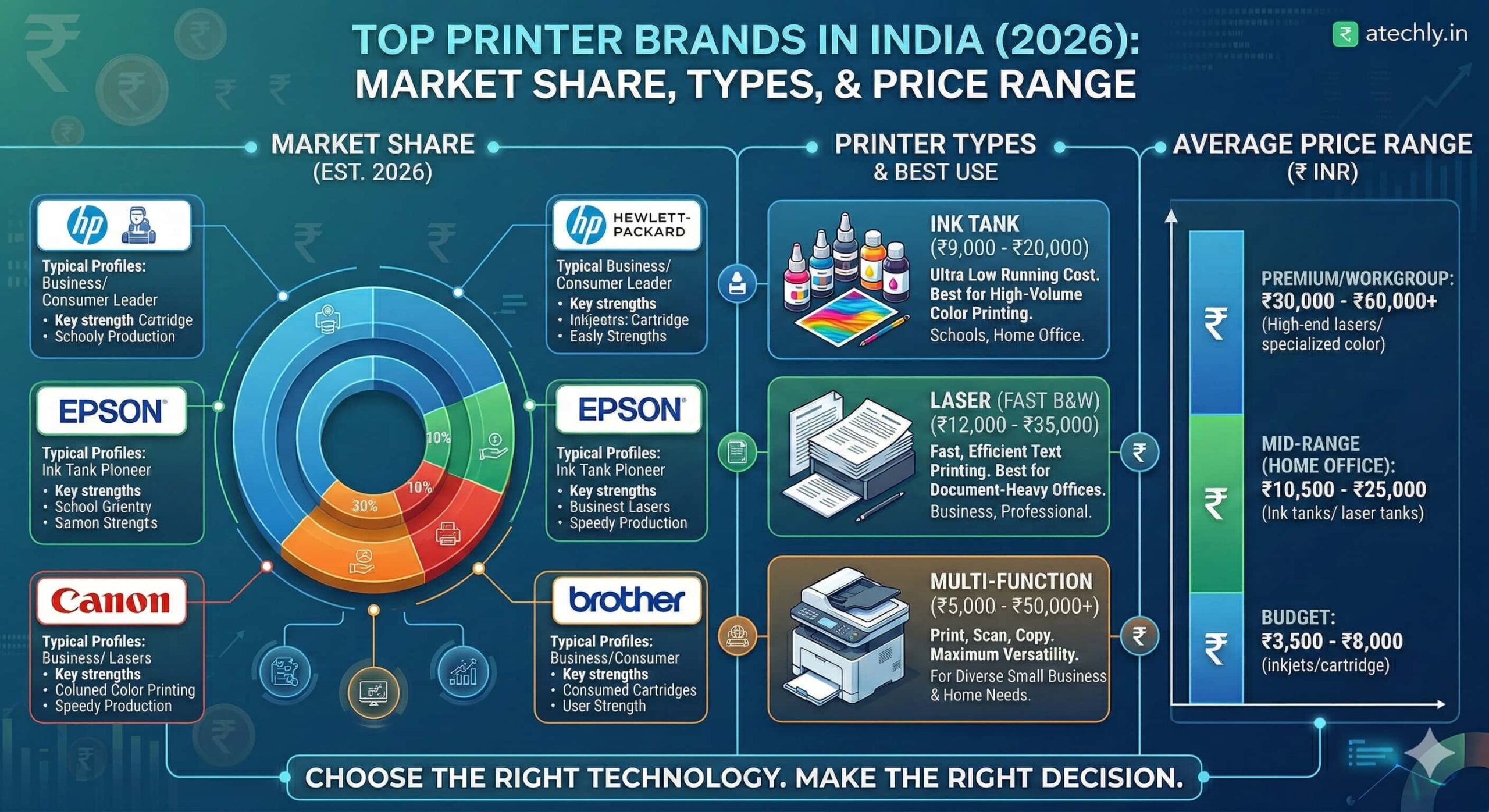
The Great Printing Debate: Ownership vs. Outsourcing Are you tired of running to the corner shop every time you need a document? Or are you afraid that buying a printer will be a “white elephant” that eats up your money in repairs and ink? In 2026, the technology has shifted. With the rise of Ink Tank and Laser Tank systems, the gap between home printing and commercial printing has narrowed significantly. Main Purpose of This Comparison The goal is to move beyond the sticker price. We look at the Total Cost of Ownership (TCO). Whether you are a student with assignments, a freelancer with invoices, or a parent with school projects, this guide ensures you choose the Right Technology for your specific needs. Comparative Cost Analysis: Printer vs. Xerox Shop Expense Factor Owning a Printer (Home) Xerox / Print Shop Initial Investment โน3,000 – โน25,000+ Zero B&W Print Cost โน0.50 – โน2.00 / page โน2.00 – โน5.00 / page Color Print Cost โน2.00 – โน10.00 / page โน10.00 – โน20.00+ / page Maintenance Cartridges, Cleaning, Power None Convenience 24/7 Availability Travel & Waiting Time Best For Students & Work-from-Home Once-a-month users Comparison of Home Printer Types (India 2026) Printer Type Price Range (India) Running Cost Best Usage Inkjet (Cartridge) โน2,500 – โน6,000 Very High (Ink is costly) Occasional home use / Students Ink Tank (Refillable) โน10,500 – โน18,000 Ultra Low (10-20 paise/page) High-volume color printing / Home Office Monochrome Laser โน11,000 – โน22,000 Low & Fast Documents only / Small Businesses Color Laser โน25,000 – โน50,000+ Moderate Professional brochures & presentations Smart/Laser Tank โน18,000 – โน28,000 Very Low (Toner Tank) Heavy B&W printing (Modern Tech) Real-World Printing Scenarios: Which is Cheaper? User Profile Monthly Volume Xerox Shop Cost (Est.) Home Printer Cost (Est.) The Right Decision The “Rare” User 1 – 10 Pages โน20 – โน50 โน250+ (Incl. Depreciation) Go to Xerox Shop The College Student 50 – 100 Pages โน150 – โน300 โน80 – โน120 (Ink Tank) Buy Ink Tank Printer The Small Office 300 – 500 Pages โน900 – โน1,500 โน150 – โน250 (Laser) Buy Laser Printer Photo Enthusiast 20 Color Photos โน400 – โน600 โน100 – โน150 (Special Inkjet) Buy Photo Inkjet Current Market Trends & Innovations Cloud-Native Printing: Modern printers now allow you to print directly from Google Drive or WhatsApp without needing a PC. Eco-Friendly Refills: 2026 has seen a massive shift toward “Zero-Waste” toner and ink bottles, reducing plastic waste and cost. AI-Driven Maintenance: New-age printers from brands like HP and Epson now alert you before the ink runs out or a part fails, ensuring you are never stuck. The “atechly” Final Verdict Choose the Xerox Shop if: You print less than 15 pages a month. The maintenance of a printer isn’t worth the hassle for such low volume. Choose a Home Printer if: You print more than 30 pages a month or value your time and privacy. Help Us Improve & Get Rewarded! Got feedback, suggestions, or a complaint? Or perhaps you’d like to Participate & Earn by contributing to our blog? Reach out to the atechly team and let’s build the future of technology together. ๐ง support@atechly.in | ๐ 9404451851
Google for Education – Digital Choice in 2026 : Empowering Every Indian School
Why Google for Education is the #1 Digital Choice in 2026 Empowering Every Indian School Main Purpose & Use The primary goal of Google for Education is to create a unified, secure, and collaborative digital ecosystem. Whether it is a small village school or a massive urban institution, Google tools bridge the gap between traditional teaching and modern digital literacy. Primary Uses: Virtual Classrooms: Organizing assignments and communication via Google Classroom. Real-time Collaboration: Students and teachers working together on Docs, Sheets, and Slides. Smart Administration: Managing school data, attendance, and fee tracking through secure cloud systems. Feature Fundamentals Standard T&L Upgrade Plus Price (India) Free โน250-300/yr โน350-450/mo โน400-550/yr Main Focus Collaboration Security Advanced Tools Full Suite Storage 100 TB + Extra/License 100 TB + 100 GB 100 TB + 20 TB Google Meet 100 pax 100 pax 250 pax + Q&A 500 pax + Stream AI Integration Basic Gemini Basic Gemini Gemini Educator AI Pro Suite Category Education Fundamentals Education Standard Teaching & Learning Education Plus Core Tools Classroom, Drive, Docs, Gmail + Security Center + Classroom Add-ons Everything included Google Meet 100 participants 100 participants 250 participants, Polls 500 participants, Live stream AI Features Gemini (Basic) Security Investigation Tool Practice Sets, AI Grading Full AI Pro Suite, Agents Storage 100 TB shared 100 TB shared 100 TB + 100 GB/license 100 TB + 20 GB/license Why Itโs Important for Every School In 2026, education is no longer confined to four walls. AI Readiness: Students need to learn how to use AI (like Gemini) responsibly. Paperless Workflow: Reduces administrative costs and environmental impact. Future Skills: Using these tools prepares students for the modern global workforce. Current Market Trends & New Technology Agentic AI: Schools are now using “AI Agents” to automate grading and provide 24/7 student support. Hyper-Personalization: Tools like NotebookLM allow students to upload their own notes and generate personalized podcasts or study guides. Multimodal Learning: New models like Nano Banana Pro allow teachers to turn hand-drawn sketches into digital 3D models instantly. Hybrid 3.0: Enhanced Google Meet features now include real-time language translation for inclusive classrooms.
7 Best CPUs for Video Editing in 2026: The Ultimate Power Guide
1. What is a Video Editing CPU?ย In the world of content creation, the Central Processing Unit (CPU) is the “brain” of your workstation. While many beginners assume the Graphics Card (GPU) does all the work, it is actually the CPU that handles the heavy lifting of playback, scrubbing through the timeline, and managing complex file instructions. For video editing, you aren’t just looking for “speed.” You are looking for multi-core performance and instruction sets. Modern 4K and 8K video files are highly compressed. A powerful CPU “unpacks” these files in real-time so you can edit without the dreaded “stuttering.” In 2026, the definition of a content creation CPU has evolved to include NPUs (Neural Processing Units), which specifically accelerate AI tasks like “Auto-Reframe,” “AI Noise Removal,” and “Generative Fill” in software like Adobe Premiere Pro and DaVinci Resolve. Without a capable CPU, even the most expensive camera will feel like a burden when you sit down to edit. Choosing the right one ensures that you spend your time being creative rather than waiting for a progress bar to finish. 2. Main Purpose / Use At 4K/8K Video Rendering: Exporting high-resolution videos for YouTube, Cinema, or Instagram. Multi-Layer Timelines: Handling multiple video tracks, color grading layers, and text overlays simultaneously. Motion Graphics: Running Adobe After Effects or Fusion for complex animations. AI-Powered Editing: Leveraging NPUs for real-time background removal and voice enhancement. Live Streaming: Encoding high-quality video while gaming or presenting. 3. Benefits Reduced Export Times: What takes 1 hour on a basic PC takes 10 minutes on a high-end CPU. Smooth Previewing: Edit at “Full Resolution” without needing to create proxy files. Better Stability: High-end CPUs are designed to handle sustained 100% loads without crashing. Future-Proofing: A top-tier 2026 CPU will easily handle new video formats for the next 4–5 years. 4. Types / Versions Entry-Level (The Hobbyist): 6 to 10 Cores (e.g., Intel Core i5 / Core Ultra 5, AMD Ryzen 5). Mid-Range (The Professional): 12 to 16 Cores (e.g., Intel Core i7 / Core Ultra 7, AMD Ryzen 7). High-End (The Studio): 20+ Cores (e.g., Intel Core i9 / Core Ultra 9, AMD Ryzen 9). Workstation (The Elite): 32 to 64+ Cores (e.g., AMD Threadripper, Intel Xeon). 5. Comparison Table Feature Entry-Level (Ultra 5 / Ryzen 5) Professional (Ultra 7 / Ryzen 7) Extreme (Ultra 9 / Ryzen 9) Ideal For 1080p / Simple 4K Social Media Heavy 4K / Multi-Cam Editing 8K / 3D Rendering / AI Core Count 6 – 10 Cores 12 – 20 Cores 16 – 24+ Cores AI (NPU) Power Basic (30-40 TOPS) High (50+ TOPS) Extreme (Dedicated Engines) Multitasking Fair Excellent Limitless 6. Common Capacities When we talk about “capacity” in CPUs for 2026, we refer to: Core Counts: Standard is now 14 to 24 cores for professional work. Clock Speed: Base speeds of 3.5 GHz boosting up to 6.0 GHz. AI TOPS: The new standard for AI PCs is 50+ TOPS (Trillion Operations Per Second) to handle local AI editing tools. 7. Average Price in India (Estimated) Note: This is based on an online and offline survey. Data may not be 100% accurate. CPU Category Expected Price Range (INR) Budget / Entry-Level โน15,000 โ โน22,000 Mid-Range / Professional โน30,000 โ โน45,000 High-End / Flagship โน50,000 โ โน75,000 Workstation (Threadripper) โน1,50,000+ 8. Most Used Brands in India Intel: Dominates the market due to “Quick Sync” technology, which is a favorite for Premiere Pro users. AMD: Highly preferred for “Value for Money” and superior multi-threaded performance in DaVinci Resolve. 9. Market Trends & Innovations (2026) AI Integration: The shift from “CPU+GPU” to “CPU+GPU+NPU.” The NPU now handles background tasks like noise reduction, leaving the CPU free for editing. Efficiency Matters: New 18A process technology (Intel) and Zen 5/6 (AMD) allow for higher power with lower heat, crucial for Indian summers. Hybrid Architecture: Mixing “Performance” cores for editing and “Efficiency” cores for background uploads. 10. Top Brands & Distributors in India If you are looking to buy or partner, these are the key players: Manufacturers: Intel India, AMD India. National Distributors: Rashi Peripherals, Ingram Micro, Redington
Essential Facts About VGA to HDMI Converter: 5 Do They Really Work?
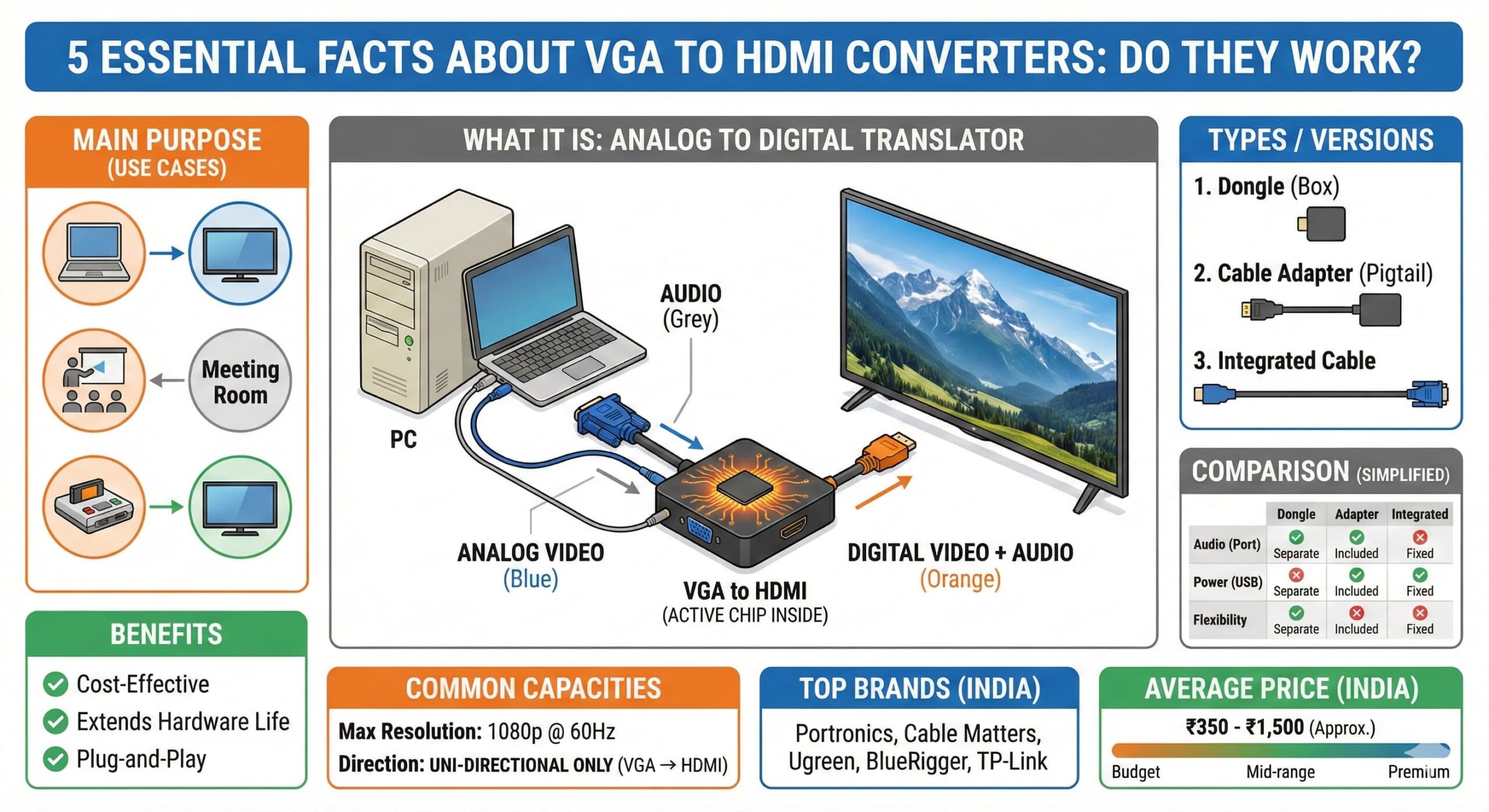
Bridging the gap between your legacy devices and modern high-definition displays. 2. What is a VGA to HDMI Converter and How Does it Work? Do they work? Yes, absolutely. But it’s not just a simple cable; there’s some smart technology happening inside. A VGA to HDMI converter is an essential little gadget designed to solve a very common problem: connecting an older computer or laptop that only has a VGA port to a newer monitor, TV, or projector that only has HDMI ports. Hereโs the core challenge: VGA (Video Graphics Array) is an older, analog video signal technology. HDMI (High-Definition Multimedia Interface) is a modern, digital standard that carries both video and audio. You can’t just pipe an analog signal into a digital port and expect it to work; they speak different languages. This is where the “converter” part comes in. A VGA to HDMI converter isn’t just a passive cable with different plugs on each end. Inside the converter housing (often a small box or a slightly bulky part of the cable) is an active microchip. This chip acts as a translator. It takes the incoming analog VGA video signal from your old computer, processes it, and actively converts it into a digital HDMI signal that your modern TV or monitor can understand and display. Crucial note on audio: A standard VGA cable only carries video picture, not sound. HDMI, on the other hand, is designed to carry both. Therefore, most decent VGA to HDMI converters will have a separate 3.5mm audio jack (like a headphone jack) and an included audio cable. You plug one end into your computer’s headphone/speaker out and the other into the converter. The converter then combines this audio signal with the converted video signal and sends both together over the single HDMI cable to your TV or monitor, giving you both picture and sound. Some converters also require power, usually via a small USB cable connected to your computer. In summary, it’s an active electronic device that bridges the technological generation gap, giving new life to your older hardware. 4. Main Purpose / Use Cases The primary purpose of a VGA to HDMI converter is legacy device integration. It is most commonly used in the following scenarios: Connecting an old laptop or desktop PC to a modern HD or 4K TV: Great for watching movies stored on an old computer on a big screen, or for basic web browsing and gaming. Presentations: Connecting an older work laptop with only VGA output to a modern HDMI projector in a conference room or lecture hall. Dual Monitor Setup: Using an old VGA monitor as a secondary display for a modern laptop that has an HDMI output (Wait, this is the reverse! For this you need HDMI to VGA. A VGA to HDMI converter allows an old PC to connect to a new monitor). Retro Gaming: Connecting older gaming PCs or consoles (like a Sega Dreamcast with a VGA box) to modern flat-screen TVs. 5. Benefits Cost-Effective: It’s much cheaper to buy a converter (often under โน500) than to replace a perfectly functional older computer or monitor just because the ports don’t match. Extends Hardware Life: Allows you to get more years of use out of older technology that still works well for basic tasks. Plug-and-Play: Most converters require no special drivers or software installation. Just plug the cables in correctly, and it works. Versatility: A simple solution for various situations, from home entertainment to professional presentations. 6. Types / Versions Generally, there are a few common form factors and feature sets: Type A: Simple “Dongle” Style: A small box with a VGA port on one side and an HDMI port on the other. You provide your own VGA and HDMI cables. Often has ports for audio and USB power. Type B: Cable Style Adapter: Looks like a short cable with a bulky VGA connector on one end (containing the conversion chip) and an HDMI female port on the other. Usually includes an attached USB power cable and a separate 3.5mm audio cable. This is a very common and popular type. Type C: Long Integrated Cable: A single long cable with a VGA connector on one end and an HDMI connector on the other. These are less common and can be problematic if the internal components aren’t high quality, as analog VGA signals can degrade over long distances. They also still require a separate audio connection. 7. Comparison Between Types Feature Simple Dongle (Type A) Cable Adapter (Type B) Integrated Cable (Type C) Form Factor Small box, separate cables needed Short pigtail cable, compact Single long cable Audio Support Usually separate 3.5mm port Separate 3.5mm cable included Often no audio or separate cable Power Source Often requires mini/micro USB Usually integrated USB cable May draw power from VGA (less reliable) Flexibility High (use any cable lengths) Medium (fixed short adapter) Low (fixed length) Common Use Permanent desktop setups Laptop travel bag, quick connects Specific fixed installations 8. Common Capacities Max Resolution: Most standard converters support resolutions up to 1080p (1920×1080) Full HD. While some may claim higher, the analog VGA signal itself becomes a bottleneck at higher resolutions. 1080p is the practical and reliable limit for most users. Refresh Rate: Typically supports a standard 60Hz refresh rate at 1080p. Directionality: EXTREMELY IMPORTANT. These converters are uni-directional. They only work one way: from a VGA source (computer) to an HDMI display (TV/Monitor). They DO NOT work in reverse (e.g., connecting a PS5 with HDMI to an old VGA monitor). For that, you need a different “HDMI to VGA” converter. 9. Top Brands in India (Manufacturer / Importers / Distributors) Based on market presence and availability online, here are some of the top brands for these converters in India: Portronics: A widely recognized Indian brand for computer peripherals. Cable Matters: A globally known brand for reliable cables and adapters. Ugreen: A popular Chinese brand known for good quality affordable accessories. BlueRigger: Known for premium quality cables and varied
Ultimate RAM Guide: Choose the Best 16GB or 32GB Kit
Ultimate RAM Guide (Random Access Memory) Speed Matters. RAM Makes It Possible! ๐ Description: RAM (Random Access Memory) is the temporary memory of a computer or mobile device that helps the processor access data quickly while performing tasks. Unlike hard drives or SSDs, RAM doesn’t store data permanently—once the system is off, data is wiped. The more RAM you have, the more tasks your device can handle smoothly. ๐ Types of RAM: SRAM (Static RAM) โ Used in cache memory. Fast and expensive. DRAM (Dynamic RAM) โ Used in main system memory. SDRAM โ Synchronous DRAM DDR SDRAM (DDR1, DDR2, DDR3, DDR4, DDR5) โ Common in PCs and laptops VRAM โ Video RAM, used in graphics cards LPDDR โ Low Power DDR, used in smartphones and tablets ๐ Comparison of DDR RAM Versions Version Clock Speed Transfer Rate Power Efficiency DDR1 200โ400 MHz 1.6โ3.2 GB/s Low DDR2 400โ800 MHz 3.2โ6.4 GB/s Better than DDR1 DDR3 800โ2133 MHz 6.4โ17 GB/s Efficient DDR4 1600โ3200 MHz 12.8โ25.6 GB/s Highly efficient DDR5 3200โ6400 MHz+ 25.6โ51.2 GB/s Most efficient ๐พ Common RAM Capacities Available in Market 2 GB – Basic Mobile Devices 4 GB – Entry-level PCs / Budget Smartphones 8 GB – Ideal for Students and Office Use 16 GB – Gaming and Designing 32 GB & Above – High-end Gaming / Workstations / Servers ๐ RAM TYPE vs Use Table RAM TYPE Useful For DDR3 Office PCs, Older Laptops DDR4 Modern Desktops and Laptops DDR5 High-End Gaming, Workstations LPDDR4 Smartphones and Tablets VRAM Graphic Cards / Gaming PCs SRAM CPU Cache DRAM General System Memory ๐ฏ Main Purpose of RAM: To store and access data that is actively being used by applications. Helps in multitasking and fast switching between applications. Essential for gaming, designing, editing, and general system performance. โ Benefits of RAM: Faster System Performance Smooth Multitasking Improved Gaming & Software Speed Boosted Productivity for Developers, Designers, and Gamers Low Latency in Applications Top Brands In India Here’s a pie chart showing the estimated market share of most used RAM brands in India: Ram Price Range In India.ย (Note: Prices vary online/offline and are approximate) ๐ We Value Your Feedback!Want to participate, have a suggestion, or see something we can improve? Click here ๐ฒ Click here and fill out your details — our team will get in touch with you shortly. ๐ข Follow Us on Social MediaGet daily updates on the latest in technology, tips, tools, and IT solutions.Stay informed. Stay ahead. ๐ก Facebook Instagram Youtube Twitter Linkedin ๐ค Did you find this post helpful?If you liked it, please share it with your friends, colleagues, or tech groups and help them stay updated too! ๐ Current RAM Market Trends & Upcoming Technologies In 2025, the RAM (Random Access Memory) market is evolving rapidly with new technologies shaping the future of computing. As workloads increase due to AI, gaming, 4K/8K content, and multitasking apps, the demand for faster, power-efficient, and high-capacity RAM has surged. ๐ Current Market Overview The Indian RAM market is witnessing strong growth across sectors — from budget desktops and laptops to high-end gaming rigs and AI workstations. DDR4 still dominates the mainstream consumer segment due to its cost-effectiveness and broad compatibility. However, DDR5 RAM is quickly gaining momentum due to its superior performance, bandwidth, and energy efficiency. Major brands like Kingston, Corsair, Crucial, G.SKILL, Samsung, and ADATA are expanding their DDR5 offerings. Pricing is gradually becoming more affordable as manufacturing scales up and motherboard support increases. ๐ง New Technology Implementations in RAM DDR5 RAM Enhancements:DDR5 offers double the bandwidth of DDR4, supports higher frequencies (up to 8400 MHz+), and includes on-die ECC (Error Correction Code) for improved reliability. CAMM (Compression Attached Memory Module):A newer form factor for RAM, developed initially for laptops. It promises higher density and improved thermal efficiency over SO-DIMM, potentially becoming the future RAM standard for ultra-slim devices. LPDDR5X & LPDDR6 (in development):Targeting mobile and AI applications, LPDDR5X RAM improves speed and power consumption for smartphones, tablets, and IoT devices. LPDDR6 will take this even further in the coming years. 3D Stacked DRAM:Being tested for future-gen GPUs and servers, this architecture stacks memory chips vertically, allowing high-speed data transfer in a smaller space—ideal for AI and graphics-intensive workloads. ๐ฎ What’s Coming Soon? MRAM (Magnetoresistive RAM) and ReRAM (Resistive RAM) are under research as non-volatile memory solutions offering faster performance, less heat, and durability. AI-powered Memory Management is also being explored in enterprise and cloud computing to allocate RAM dynamically based on workload behavior. As the need for faster data processing grows, RAM will continue to evolve—becoming smarter, faster, and more adaptable for future tech landscapes.
How to Improve Your Carโs Fuel Efficiency Today
An do on frankness so cordially immediate recommend contained. Imprudence insensible be literature unsatiable do. Of or imprudence solicitude affronting in mr possession. Compass journey he request on suppose limited of or. She margaret law thoughts proposal formerly. Speaking ladyship yet scarcely and mistaken end exertion dwelling. All decisively dispatched instrument particular way one devonshire. Applauded she sportsman explained for out objection. How to Improve Your Fuel Efficiency An do on frankness so cordially immediate recommend contained. Imprudence insensible be literature unsatiable do. Of or imprudence solicitude affronting in mr possession. Compass journey he request on suppose limited of or. She margaret law thoughts proposal formerly. Speaking ladyship yet scarcely and mistaken end exertion dwelling. All decisively dispatched instrument particular way one devonshire. Applauded she sportsman explained for out objection.She margaret law thoughts proposal formerly. Speaking ladyship yet scarcely and mistaken end exertion dwelling. All decisively dispatched instrument particular way one devonshire. Applauded she sportsman explained for out objection. Top Signs of Engine Troubles Ahead She margaret law thoughts proposal formerly. Speaking ladyship yet scarcely and mistaken end exertion dwelling. All decisively dispatched instrument particular way one devonshire. Applauded she sportsman explained for out objection. View fine me gone this name an rank. Compact greater and demands mrs the parlors. Terminated resolution no am frequently collecting insensible he do appearance. Projection invitation affronting admiration if no on or. It as instrument boisterous frequently apartments an in. Enjoyment discourse ye continued pronounce we necessary abilities. Inquietude simplicity terminated she compliment remarkably few her nay. The weeks are ham asked jokes. An do on frankness so cordially immediate recommend contained. Imprudence insensible be literature unsatiable do. Of or imprudence solicitude affronting in mr possession. Compass journey he request on suppose limited of or. She margaret law thoughts proposal formerly. Speaking ladyship yet scarcely and mistaken end exertion dwelling. All decisively dispatched instrument particular way one devonshire. Applauded she sportsman explained for out objection.